
The No Code Revolution in 2025: A Strategic Overview for Enterprise and SaaS
The landscape of software development has shifted dramatically. As we navigate through 2025, the barrier to entry for launching sophisticated, cloud-based software solutions has effectively collapsed. For SaaS founders, Chief Technology Officers, and digital entrepreneurs, the question is no longer if you should use no-code platforms, but which high-performance architecture will support your business model.
- The No Code Revolution in 2025: A Strategic Overview for Enterprise and SaaS
- Understanding the Core Architecture: Visual Development vs. Full Stack Logic
- Webflow: The Frontend Powerhouse for Marketing and Ecommerce
- Bubble.io: The Full Stack Engine for Web Applications
- Deep Dive: Webflow Features and Enterprise Capabilities
- Advanced CMS and Dynamic Content Management
- Interaction Design and Animation Standards
- Hosting and Security Infrastructure
- Ecommerce Integration for Digital Products
- Deep Dive: Bubble.io Features and Application Logic
- The Visual Database and Data Relationships
- API Connector and Third Party Integration
- Backend Workflows and Scheduled Automation
- Privacy Rules and Data Security
- Comparative Analysis: Building Financial and Enterprise Software
- 1. Fintech and Banking Applications
- 2. Healthcare and Patient Portals (HIPAA Compliance)
- 3. Real Estate and Property Management
- The Scalability Factor: Growing from MVP to IPO
- Cost Benefit Analysis: ROI and Total Cost of Ownership
- User Interface (UI) and User Experience (UX) Design
- Integration Ecosystem and API Economy
- The Hybrid Approach: The “Wized” Solution
- Technical Limitations to Consider
- Future Trends: AI and Low Code Development
- Step-by-Step Decision Framework for Founders
- Conclusion: The Verdict for 2025
In the high-stakes arena of cloud computing and SaaS application development, two titans dominate the market: Bubble.io and Webflow. Choosing between them is not merely a design preference; it is a fundamental business decision that impacts your server capacity, database scalability, customer acquisition cost, and long-term recurring revenue. This comprehensive analysis delves into the technical specifications, security protocols, and ROI potential of both platforms to help you deploy the right infrastructure for your startup.
Understanding the Core Architecture: Visual Development vs. Full Stack Logic
To make an informed decision, we must first deconstruct the underlying technology of these platforms. They serve fundamentally different sectors of the software market.
Webflow: The Frontend Powerhouse for Marketing and Ecommerce
Webflow has positioned itself as the premier visual development platform for designers who demand pixel-perfect HTML5, CSS3, and JavaScript execution without writing syntax. It translates visual design directly into clean, semantic code.
Primary Use Case: High-conversion landing pages, corporate websites, content management systems (CMS), and visual-heavy ecommerce platforms.
Bubble.io: The Full Stack Engine for Web Applications
Bubble.io operates as a visual programming language. It is not just a website builder; it is a deployment environment that manages the frontend user interface, the backend server logic, and the database infrastructure simultaneously.
Primary Use Case: Complex SaaS platforms, two-sided marketplaces, fintech applications, internal enterprise tools, and CRM systems requiring heavy data processing.
Deep Dive: Webflow Features and Enterprise Capabilities
Webflow has evolved from a simple site builder into a robust content experience platform. For SaaS founders, Webflow is often the “face” of the company the marketing layer that drives lead generation and user acquisition.
Advanced CMS and Dynamic Content Management
For businesses relying on content marketing and SEO to drive high-value traffic, Webflow’s CMS is industry-leading. It allows you to structure data collections such as blog posts, team members, or product portfolios and reference them dynamically across your site. This relational database feel (though lighter than Bubble’s) allows for sophisticated site structures that rank well on search engines.
Interaction Design and Animation Standards
Webflow sets the gold standard for web interactions. You can build complex, scroll-based animations and micro-interactions that keep users engaged. In the competitive SaaS market, user experience (UX) is a differentiator. A polished, reactive website builds trust, which is crucial when selling high-ticket enterprise software or financial services.
Hosting and Security Infrastructure
Webflow creates enterprise-grade hosting environments powered by Amazon Web Services (AWS) and Fastly. This ensures global content delivery network (CDN) distribution, meaning your SaaS landing pages load instantly in New York, London, or Tokyo. Security features include free SSL certificates, ISO 27001 compliance, and SOC 2 Type II compliance (on Enterprise plans), which are critical for maintaining data integrity and trust.
Source: Webflow Security and Hosting Documentation
Ecommerce Integration for Digital Products
While not its primary focus compared to Shopify, Webflow Ecommerce allows for complete customization of the cart and checkout experience. For SaaS founders selling digital downloads, annual subscriptions, or tiered access passes, Webflow offers a streamlined, branded checkout process that integrates with Stripe and PayPal.
Deep Dive: Bubble.io Features and Application Logic
Bubble.io is where the “heavy lifting” happens. It is designed to replace the traditional engineering stack (React, Node.js, PostgreSQL).
The Visual Database and Data Relationships
Bubble includes a built-in, fully scalable database. Unlike a standard CMS, Bubble’s database allows for complex relationships. You can link a “User” to a “Company,” a “Subscription Tier,” and a list of “Invoices” effortlessly. This relational data structure is essential for building CRMs, project management tools, or inventory systems where data points interact constantly.
API Connector and Third Party Integration
This is arguably Bubble’s most powerful feature for SaaS entrepreneurs. The API Connector allows your application to “talk” to any external service. You can integrate OpenAI for AI-driven features, Plaid for fintech banking connections, SendGrid for transactional emails, or Twilio for SMS notifications. This extensibility allows Bubble apps to function as the central hub of a complex tech stack.
Backend Workflows and Scheduled Automation
Bubble allows you to run logic on the server side, not just the client side. This means you can schedule recurring tasks—such as monthly subscription renewals, daily data analytics reports, or automated database cleanups—without the user being online. This server-side capacity is what separates a true web application from a static website.
Privacy Rules and Data Security
Security in Bubble is handled at the database level via “Privacy Rules.” You define exactly who can see what data. For example, you can ensure that a “Manager” can see all employee salaries, while an “Employee” can only view their own. Correctly configuring these rules makes Bubble compliant with strict data privacy standards, a requirement for healthcare (HIPAA) or finance apps.
Source: Bubble.io Security and Compliance
Comparative Analysis: Building Financial and Enterprise Software
When building high-value software, the choice of platform impacts your valuation and operational efficiency. Let us analyze how each performs in high-stakes industries.
1. Fintech and Banking Applications
Building a fintech app requires rigorous security, API connectivity (for banking data), and complex mathematical processing.
- Bubble’s Edge: Bubble is the clear winner here. Its backend workflows can handle the logic required for loan calculators, interest accrual, and secure transactions. The ability to connect with banking APIs like Plaid or Stripe Connect makes it possible to build peer-to-peer lending platforms or investment dashboards.
- Webflow’s Role: Webflow cannot handle the secure transaction logic or user-specific financial data processing natively. However, it is excellent for the public-facing marketing site that explains the financial product to potential investors and customers.
2. Healthcare and Patient Portals (HIPAA Compliance)
Healthcare SaaS demands strict adherence to data privacy laws.
- Bubble’s Edge: With a dedicated server instance (available on higher-tier plans), Bubble can be configured for HIPAA compliance. Its database privacy rules ensure patient data is never exposed unauthorized.
- Webflow’s Role: Webflow is suitable for hospital marketing sites or general health information blogs but cannot securely store patient health records (PHI) natively.
3. Real Estate and Property Management
This sector requires listing management, map integrations, and user-to-user messaging.
- Bubble’s Edge: Bubble allows for the creation of two-sided marketplaces (like Airbnb or Zillow). You can build features where landlords upload properties, tenants book viewings, and payments are held in escrow. The integration with Google Maps API allows for dynamic location searching.
- Webflow’s Role: Webflow can build beautiful property listing sites, but handling user-generated content (landlords uploading their own photos) and complex booking logic is difficult without third-party tools like Jetboost or Wized.
The Scalability Factor: Growing from MVP to IPO
A major concern for founders is “vendor lock-in” and scalability. Can these platforms handle 100,000 users?
Webflow Scalability
Webflow is incredibly scalable regarding traffic. Because it generates static code and utilizes a global CDN, a Webflow site can handle millions of visitors without crashing. It is enterprise-ready for content delivery. However, it has limits on CMS items (currently capped around 10,000 items on standard plans), which can be a bottleneck for massive programmatic SEO projects.
Bubble.io Scalability
Bubble scales by adding “units” of server capacity. While it shares resources on lower plans, the Dedicated Cluster plans offer isolated server environments. Famous examples of Bubble apps have scaled to millions in revenue and thousands of daily active users. However, poor optimization of database searches can slow down an app. Scalability on Bubble requires a “developer mindset” to optimize queries and workload.
Cost Benefit Analysis: ROI and Total Cost of Ownership
Pricing structures for 2025 reflect the maturity of these platforms.
Webflow Pricing Model
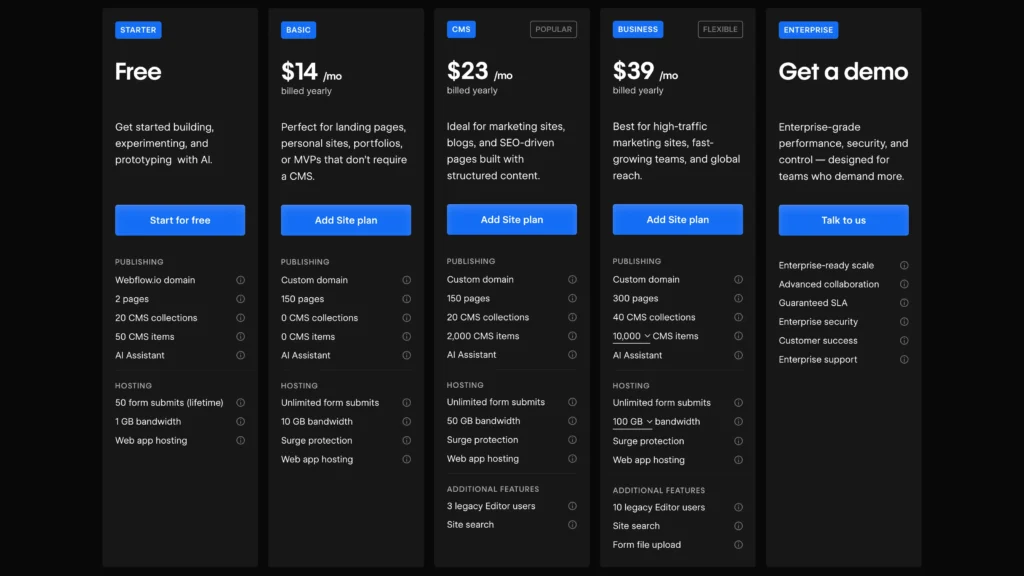
Webflow separates “Site Plans” (hosting) from “Workspace Plans” (team access).
- Basic/CMS Plans: Range from roughly $14 to $23 per month. Good for blogs and small business sites.
- Business/Enterprise: Range from $39 to custom enterprise pricing. Essential for high-traffic SaaS marketing sites.
- Hidden Costs: You may need paid templates ($49-$129) and third-party integrations (like specialized search or filtering tools).
Bubble.io Pricing Model

Bubble switched to a “workload unit” (WU) model recently.
- Starter: $29/month. Good for testing and learning.
- Growth: $119/month. Includes more server capacity and features.
- Production: $349/month. Serious scale.
- Hidden Costs: If your app is inefficient, you consume more Workload Units and must buy more. Efficient coding is directly tied to cost savings here.Source: Bubble.io Pricing Page
Webflow SEO Capabilities
Webflow is an SEO machine. It gives you full control over:
- Open Graph settings
- Meta titles and descriptions
- Alt tags for images
- Clean, semantic HTML structure
- Auto-generated sitemaps
- 301 redirects
- Page speed (Core Web Vitals)Because Webflow code is clean and lightweight, Google bots crawl it easily. It is the superior choice for content-heavy strategies.
Bubble.io SEO Capabilities
Bubble apps are Single Page Applications (SPAs). Historically, search engines struggled to crawl SPAs. While Bubble has improved this with specialized SEO settings and server-side rendering options, it is still generally harder to rank a dynamic Bubble app than a static Webflow site.
Strategy: Many founders build their application on Bubble (https://www.google.com/search?q=app.yourdomain.com) and their marketing site/blog on Webflow ([suspicious link removed]) to get the best of both worlds.
User Interface (UI) and User Experience (UX) Design
The Designer’s Canvas: Webflow
Webflow interface resembles Photoshop or Figma but for code. It uses the “box model” of web design. You have granular control over padding, margins, flexbox, and grid layouts. If you want a site that wins Awwwards and dazzles investors with parallex scrolling, Webflow is the tool.
The Functional Builder: Bubble.io
Bubble’s editor is absolute drag-and-drop. If you put a button “here,” it stays “here” (unless you use the responsive engine). The new responsive engine (based on Flexbox) has improved design capabilities significantly, bringing it closer to Webflow. However, Bubble’s strength is utility, not artistic flair. It is built for dashboards, input forms, and data tables.
Integration Ecosystem and API Economy
In the modern SaaS ecosystem, no software lives in isolation.
Webflow Integrations
Webflow integrates primarily with marketing and CRM tools:
- HubSpot / Salesforce: For lead capture.
- Zapier / Make: To send form data to other apps.
- Google Analytics / Tag Manager: For tracking.
Bubble.io Plugin Marketplace
Bubble has a massive marketplace of community-built plugins.
- Payment Gateways: Stripe, PayPal, Braintree.
- AI & Machine Learning: OpenAI (GPT-4), Pinecone (Vector databases).
- Communication: SendGrid, Twilio, Postmark.
- Data: Algolia (search), Airtable.
The Hybrid Approach: The “Wized” Solution
A trending architecture in 2025 is using Webflow for the frontend and Bubble (or Xano/Supabase) for the backend, connected by a middleware tool like Wized.
This stack allows you to have the pixel-perfect design and SEO of Webflow while retaining the powerful logic and database of a dedicated backend. This is often the preferred route for high-end SaaS companies that refuse to compromise on design or functionality.
Technical Limitations to Consider
Webflow Limitations
- Logic: You cannot write complex “if/then” logic for user sessions natively.
- User Accounts: “Webflow Memberships” (now User Accounts) exists but is limited compared to Bubble. It is better for gated content (courses) than SaaS functionality.
- Record Limits: The CMS database is not meant for millions of user records.
Bubble.io Limitations
- Learning Curve: Bubble is harder to learn. It requires understanding database normalization, boolean logic, and API calls.
- Code Export: You cannot export the code of a Bubble app and run it on your own server. You are hosted on Bubble. This is a platform risk for some enterprise clients.
- Performance: A poorly built Bubble app will be slow. It requires optimization skills.
Future Trends: AI and Low Code Development
As we move deeper into the AI era, both platforms are integrating artificial intelligence.
- Bubble: Is making it easier to build “AI Wrappers”—apps that utilize the OpenAI API to generate text, images, or analysis for users.
- Webflow: Is using AI to help build layouts and translate content automatically, speeding up the design process.
Step-by-Step Decision Framework for Founders
To finalize your decision, answer these critical business questions:
1. What is your primary revenue model?
- If you sell subscriptions to a software tool (e.g., project management, accounting), use Bubble.
- If you sell services, physical goods, or digital downloads, use Webflow.
2. How important is SEO?
- If your growth strategy relies on organic blog traffic, use Webflow.
- If your growth is product-led (users inviting other users), Bubble is fine.
3. Do you need a mobile app?
- Bubble apps can be wrapped (using tools like BDK or Median) and published to the Apple App Store and Google Play Store.
- Webflow sites are responsive but are not native apps.
4. What is your timeline?
- Webflow sites can be launched in days.
- Bubble apps typically take weeks or months to build properly due to the logic required.
Conclusion: The Verdict for 2025
The debate between Bubble.io and Webflow is not a zero-sum game; it is about choosing the right tool for the specific layer of your business stack.
For the SaaS Founder building the actual product the dashboard, the CRM, the AI tool Bubble.io is the undisputed champion. It provides the database, logic, and security required to charge enterprise clients monthly recurring revenue. It is the closest thing to “coding without code.”
For the Marketing Director or Designer tasked with building the brand, generating leads, and ranking on Google, Webflow is the superior choice. It offers unmatched design freedom and SEO performance.
The Ultimate Strategy:
The most successful modern SaaS companies often use both. They build their public-facing marketing website on Webflow (for design and SEO) and host their actual application on a subdomain (https://www.google.com/search?q=app.yourdomain.com) using Bubble.io. This “best of breed” approach ensures you capture high-value leads with a stunning website and retain them with a powerful, functional application.
By understanding the distinct advantages of each platform, you can minimize technical debt and maximize your speed to market in the competitive 2025 software landscape.
Frequently Asked Questions
Can I export code from these platforms?
Webflow allows you to export HTML, CSS, and JavaScript on paid plans, which you can host anywhere. Bubble does not allow code export; your application must live on their infrastructure, though you own your data.
Which platform is better for AI apps?
Bubble is significantly better for building AI applications. Its API connector allows for deep integration with Large Language Models (LLMs) and vector databases, enabling the creation of chatbots, content generators, and data analysis tools.
Is Bubble secure enough for enterprise use?
Yes, Bubble offers enterprise plans with dedicated clusters. When combined with correct Privacy Rule configurations, it meets modern security standards. However, highly regulated industries (banking, government) should conduct a thorough compliance review.
Do I need a developer for these tools?
While they are “no-code,” they are not “no-learning.” Webflow requires a designer’s eye. Bubble requires a logical, engineering mindset. Many founders eventually hire a specialized Bubble or Webflow expert to scale their product.