

In the hyper-competitive landscape of 2025, speed is no longer just a technical metric; it is the primary currency of digital commerce. For WooCommerce store owners, the infrastructure powering their online storefronts defines their revenue potential. If your store takes more than three seconds to load, you are not just losing patience; you are losing 53% of your mobile traffic immediately.
- The Direct Correlation Between Server Speed and Revenue
- Managed Hosting vs. Shared Hosting: Understanding the Infrastructure
- Key Technologies Powering High-Speed WooCommerce
- 1. Google Cloud Platform (GCP) C2 and C3 Machines
- 2. PHP Workers and Concurrent Transactions
- 3. Object Caching with Redis
- 4. Nginx vs. Apache
- 5. Content Delivery Networks (CDN)
- Security Features That Protect Revenue
- Scalability: Surviving the “Shark Tank” Effect
- The Role of “High-Performance Order Storage” (HPOS)
- Evaluating the Top Managed WooCommerce Hosts for 2025
- The Mobile Commerce Imperative
- Expert Support: The Hidden Performance Booster
- Conclusion: An Investment, Not an Expense
- FAQ: Managed WooCommerce Hosting
This comprehensive guide explores why premium managed hosting is the non-negotiable foundation for high-performance WooCommerce stores. We will dissect the server-level technologies, including Google Cloud C2 Virtual Machines and Redis Object Caching, that drive the world’s fastest eCommerce sites.
The Direct Correlation Between Server Speed and Revenue
The mathematics of eCommerce performance are brutal. As of late 2025, data indicates that the global average eCommerce conversion rate hovers between 2.5% and 3.13%. However, this average disguises a massive disparity between fast and slow websites.
A one-second delay in page load time yields a 7% reduction in conversions. For a store generating $10,000 per day, that single second of latency costs $255,000 in lost annual revenue. This “Speed Gap” is widening as consumer expectations evolve.
Core Web Vitals and SEO Rankings in 2025
Google has doubled down on page experience as a ranking factor. The Core Web Vitals thresholds—Largest Contentful Paint (LCP), Interaction to Next Paint (INP), and Cumulative Layout Shift (CLS)—are now strict gatekeepers for organic search visibility.
- LCP (Largest Contentful Paint): Measures loading performance. To rank well, LCP should occur within 2.5 seconds of when the page first starts loading.
- INP (Interaction to Next Paint): Replaces FID as the key responsiveness metric. It measures how quickly a page responds to user inputs like clicks or taps.
- CLS (Cumulative Layout Shift): Measures visual stability.
Cheap shared hosting environments simply cannot consistently meet these metrics because of resource contention. Managed WooCommerce hosting solves this by providing isolated, optimized resources dedicated to your specific store’s needs.
Managed Hosting vs. Shared Hosting: Understanding the Infrastructure
To understand why managed hosting commands a higher price point (and delivers higher ROI), one must look at the underlying architecture.
The Limitations of Shared Hosting
In a shared hosting environment, your WooCommerce store resides on a single physical server alongside hundreds, sometimes thousands, of other websites. You compete for the same CPU cycles, RAM, and disk I/O. If a “neighbor” on your server experiences a traffic spike or gets hit by a DDoS attack, your store slows down or crashes. This is the “noisy neighbor” effect.
Furthermore, shared hosts typically use standard HDD or slower SATA SSD storage and configure their web servers (Apache) for general-purpose compatibility rather than high-performance eCommerce.
The Managed Hosting Advantage
Managed WooCommerce Hosting is not just about renting server space; it is about renting a team of engineers and a platform purpose-built for transactional WordPress.
- Isolated Resources: Top-tier providers use container technology (like LXD containers) to ensure your store has dedicated resources that no other site can encroach upon.
- Server-Side Caching: Shared hosts rarely offer advanced caching. Managed hosts implement Nginx FastCGI caching specifically tuned to bypass PHP execution for static content while intelligently serving dynamic content (like the cart and checkout) without caching errors.
- Database Optimization: WooCommerce is database-intensive. Managed hosts tune the MySQL or MariaDB database servers specifically for the heavy query loads generated by product filters, order processing, and inventory management.
Key Technologies Powering High-Speed WooCommerce
When evaluating high-performance hosting, specific technical specifications directly impact your store’s ability to handle traffic and process orders. The following technologies are standard in premium managed environments in 2025.
1. Google Cloud Platform (GCP) C2 and C3 Machines
The hardware matters. Leading managed hosts like Kinsta and WP Engine have moved their infrastructure to Google Cloud Platform’s Compute-Optimized (C2) and the newer C3 virtual machines.
- Clock Speed: C2 VMs offer burstable CPU performance with clock speeds significantly higher than standard servers.
- Performance Gains: Benchmarks show that moving from standard machines to C2 machines can improve execution time for complex PHP code (like WooCommerce) by up to 30% to 50%.
- Why It Matters: WooCommerce is PHP-heavy. Faster CPU clock speeds mean faster PHP execution, which directly translates to a snappier backend for administrators and faster checkout processing for customers.
2. PHP Workers and Concurrent Transactions
A “PHP Worker” is a background process that executes the code to build a page for a visitor. On a cached page, the worker is not needed. However, the WooCommerce checkout process, “My Account” pages, and “Add to Cart” actions are dynamic and cannot be cached. They require a PHP worker to process the request.
- The Bottleneck: If your hosting plan only offers 2 PHP workers and 4 people try to check out simultaneously, 2 of them have to wait in a queue. This manifests as a spinning loading icon.
- The Solution: Managed hosting plans offer higher counts of PHP workers (often 4, 6, 12, or more depending on the tier) and allow for “auto-scaling” during traffic surges to ensure zero friction at checkout.
3. Object Caching with Redis
While page caching stores the full HTML of a page, Object Caching stores the results of database queries in the server’s RAM.
- The Problem: Every time a user visits a product page, WooCommerce queries the database to find the price, stock status, description, and variations. This is computationally expensive.
- The Redis Solution: Redis (Remote Dictionary Server) stores these values in memory. When the next user visits, the server fetches the data from RAM in microseconds rather than querying the hard drive.
- Impact: Redis is critical for scaling. It can reduce database load by over 50%, allowing your store to handle more simultaneous visitors without upgrading the server hardware. High-end managed hosts often include Redis (or Object Cache Pro) as a standard feature.
4. Nginx vs. Apache
Apache is the old standard, but Nginx (pronounced “Engine-X”) is the king of performance. Nginx is an event-driven, asynchronous web server that can handle thousands of concurrent connections with a low memory footprint.
- Reverse Proxy: Managed hosts often use Nginx as a reverse proxy in front of Apache or as a standalone web server to handle static assets (images, CSS, JS) efficiently, leaving the heavy lifting of PHP processing to the backend.
5. Content Delivery Networks (CDN)
A CDN is a network of servers distributed globally. When a user in London visits a site hosted in New York, the images and scripts are delivered from a London server, not New York.
- Cloudflare Enterprise: Many top managed hosts now integrate Cloudflare Enterprise directly into their dashboard. This provides not just a CDN, but also image optimization (Polish) and a Web Application Firewall (WAF) at the network edge.
- HTTP/3: Modern CDNs utilize the HTTP/3 protocol (QUIC), which reduces latency over unreliable connections, particularly benefiting mobile shoppers.
Security Features That Protect Revenue
Speed is irrelevant if your site is offline due to malware. Managed hosting providers include enterprise-grade security suites that would cost hundreds of dollars per month if purchased separately.
Real-Time Malware Scanning and Removal
Shared hosts will often suspend your account if you get infected. Managed hosts do the opposite: they proactively scan for malware and, if found, their engineers will clean the hack for free. This “hack-fix guarantee” provides peace of mind.
Web Application Firewall (WAF)
A WAF sits between your store and the internet, inspecting incoming traffic. It blocks malicious bots, SQL injection attacks, and Cross-Site Scripting (XSS) attempts before they reach your server. For WooCommerce, blocking “bad bots” is crucial because bots scraping your prices can exhaust your PHP workers, slowing down the site for real humans.
Automated Backups
Daily backups are standard, but managed hosts often offer “on-demand” backups. Before you update a plugin or change a price globally, you can click a snapshot button. If something breaks, you can restore the site to its previous state in seconds with a single click.
Scalability: Surviving the “Shark Tank” Effect
Every merchant dreams of their product going viral or having a record-breaking Black Friday. However, traffic spikes are the downfall of poorly hosted sites.
Auto-Scaling Architecture
True managed cloud hosting platforms (like Nexcess or Google Cloud-powered solutions) offer auto-scaling. If your traffic jumps from 100 visitors to 10,000 visitors in an hour, the infrastructure automatically allocates more RAM and CPU cores to handle the load. You are typically billed for the overage, but your site stays online and continues to process sales.
Load Balancing
For enterprise-level WooCommerce stores, managed hosting can deploy load balancers. This distributes incoming traffic across multiple servers. If one server gets overloaded, the traffic is instantly rerouted to a healthy server, ensuring 100% uptime.
The Role of “High-Performance Order Storage” (HPOS)
In 2025, WooCommerce has fully transitioned to High-Performance Order Storage (formerly Custom Order Tables). This architecture moves order data from the bloated wp_posts and wp_postmeta tables into dedicated custom tables optimized for commerce.
- Managed Hosting Support: Top managed hosts have optimized their database indices specifically for HPOS. This results in up to 30% faster order creation and 40% faster checkout retrieval. Ensuring your host supports and optimizes for HPOS is critical for future-proofing.
Evaluating the Top Managed WooCommerce Hosts for 2025
When choosing a provider, you are investing in a technology partner. Here is a breakdown of the market leaders known for high-performance infrastructure.
1. Liquid Web (Nexcess)
Nexcess is widely recognized for its “flexible cloud” platform.
- Key Feature: Their Auto-Scaling feature is unique. It grants your site free access to additional PHP workers for 24 hours during traffic spikes.
- Tech Stack: They offer a built-in plugin monitor that compares performance before and after updates, ensuring a plugin update never slows down your store.
- Best For: Stores with fluctuating traffic (seasonal sales) that need elasticity without upgrading to a permanent, expensive dedicated server.
2. Kinsta
Kinsta is a premium managed WordPress host built exclusively on the Google Cloud Platform.
- Key Feature: They use the fastest C2 machines available in all their data center locations.
- Edge Caching: Kinsta’s Edge Caching feature saves your page cache to Cloudflare’s global network. This means a user in Australia sees a cached version of your site served from a Sydney server, even if your hosting is in Iowa, reducing Time to First Byte (TTFB) to near zero.
- Best For: High-budget stores demanding the absolute lowest latency and top-tier support.
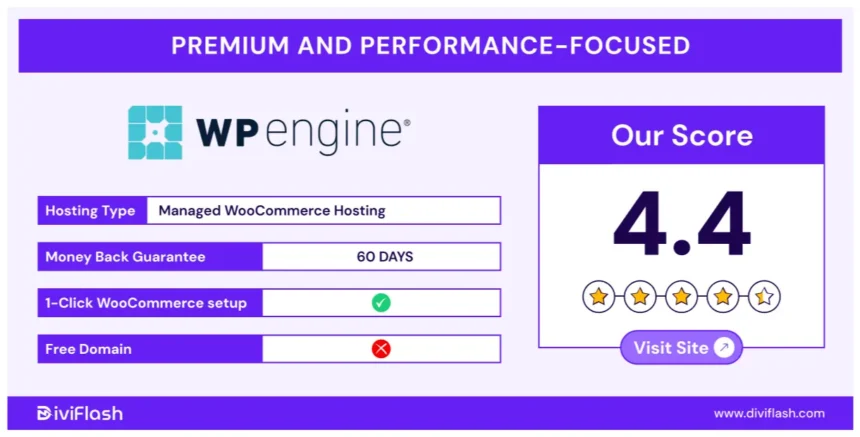
3. WP Engine
WP Engine is the largest player in the space, offering a robust “eCommerce Solutions” tier.
- Key Feature: “EverCache” is their proprietary caching layer optimized specifically for WordPress. They also offer “Live Cart” functionality which prevents the cart fragmentation issues common in caching.
- Search: Their plans often include “Instant Store Search” (powered by ElasticSearch), which offloads search queries from the database, significantly speeding up product discovery.
- Best For: Enterprise brands and agencies requiring strict compliance (SOC2) and 24/7 dedicated support.
4. Cloudways (DigitalOcean / Google Cloud / AWS)
Cloudways offers a hybrid approach. It is a managed control panel that sits on top of unmanaged cloud infrastructure like Google Cloud, AWS, or DigitalOcean.
- Key Feature: Flexibility. You can choose Google Cloud Compute machines and manage them via the easy Cloudways interface.
- Tech Stack: Their “ThunderStack” includes Varnish, Memcached, Redis, and Nginx. It is highly customizable for developers who want root-level control without the headache of command-line maintenance.
- Best For: Tech-savvy store owners who want the power of Google Cloud or AWS without the markup of fully managed support services.
The Mobile Commerce Imperative
Mobile commerce (m-commerce) accounts for nearly 73% of all eCommerce sales in 2025. Mobile devices are typically on slower networks (4G/5G) and have less processing power than desktops.
- Server Response Time: A mobile device cannot make up for a slow server. If your TTFB (Time to First Byte) is high, the mobile user stares at a blank white screen. Managed hosting ensures the TTFB is under 200ms globally.
- Image Optimization: Managed hosts often include automated image compression (WebP conversion) at the server level. This ensures that a mobile user never downloads a 2MB PNG file when a 50KB WebP file will suffice.
Expert Support: The Hidden Performance Booster
The final piece of the puzzle is human expertise. When a WooCommerce store runs slow, the cause is often complex: a conflict between a payment gateway and a shipping plugin, or a database query running wild.
- General Support: A support agent at a shared host will check if the server is “up.” If it is, they will tell you the problem is your code and end the chat.
- Managed Support: A managed hosting engineer will open New Relic (performance monitoring tool), identify the specific database query causing the slowdown, pinpoint the plugin responsible, and often recommend the exact settings change to fix it. This level of partnership saves thousands of dollars in developer hours.
Conclusion: An Investment, Not an Expense
In 2025, treating hosting as a commodity is a strategic error. For WooCommerce, hosting is the engine room. You can have the most beautiful design and the best products, but if the engine is underpowered, the vehicle will not win the race.
Managed WooCommerce Hosting provides the high-frequency CPUs, the Redis object caching, the global CDN integration, and the security parameters required to compete with giants like Amazon. The cost difference between shared hosting ($10/month) and managed hosting ($30-$100/month) is negligible compared to the revenue lost from a single abandoned cart per day.
By investing in premium infrastructure, you are buying speed, security, and scalability. You are buying the ability to handle success.
References
- Google Cloud Compute Engine Documentation
- Redis Object Caching Benefits
- WooCommerce High-Performance Order Storage
- 2025 eCommerce Conversion Stats – Skai Lama
- Impact of Site Speed on Sales – Cloudflare
FAQ: Managed WooCommerce Hosting
What is the difference between Managed WordPress and Managed WooCommerce hosting?
Managed WooCommerce hosting is a sub-category of Managed WordPress hosting. It adds specific optimizations for the eCommerce environment, such as excluding cart and checkout pages from caching, offering higher PHP worker limits to handle concurrent transactions, and including database optimizations for order tables.
Do I really need Redis for my store?
If your store has more than 500 products or receives high traffic, yes. Redis stores database queries in RAM, significantly reducing the load time for dynamic pages and filtering. It is one of the most effective ways to speed up the backend (admin panel) and the frontend catalog.
How many PHP workers do I need?
For a small store (under 1,000 visitors/month), 2-4 PHP workers are sufficient. For a mid-sized store, look for plans with 6-10 workers. High-volume stores running sales events need 12+ workers or an auto-scaling solution to prevent “checkout bottlenecks.”
Is Google Cloud better than AWS for WooCommerce?
Both are excellent, but Google Cloud’s Premium Tier network and C2 (Compute-Optimized) machines are currently favored by the top WordPress managed hosts (Kinsta, WP Engine, SiteGround) for their raw single-core performance, which benefits PHP execution.
Will moving to managed hosting fix my slow site?
It will fix server-level bottlenecks (TTFB, database processing). However, if your slowness is caused by unoptimized images, bad code in a custom theme, or too many external scripts (ads, trackers), you will still need to optimize the site itself. Managed hosting provides the best possible foundation, but it cannot fix bad code automatically.
What is TTFB and why is it important?
TTFB (Time to First Byte) is the time it takes for the user’s browser to receive the first byte of data from your server. Google recommends a TTFB of under 200ms. High TTFB indicates a slow server or lack of caching, which hurts SEO and user experience. Managed hosting consistently delivers lower TTFB than shared hosting.